Version 2 · 13 September 2026
Cropping, the CRT screen and eighteen new films
The second version is the first you can download without an invitation and try without a code: five days of the full program, nothing held back. The shelf grew from 50 films to 68, inkjet, offset and a CRT screen joined the scans and silver papers, and a frame can be cropped and levelled. Prokudin-Gorsky's plates and the pinhole arrived. Thirteen recipes, twenty-five fixes.
45 new · 25 fixed · 7 changed
The build is not yet signed by Apple: macOS will stop it the first time you open it. It takes two minutes — how to open it →
Need to roll back — here is the version 2 image. It is an old build: everything fixed later is still broken in it.
01 · New
- The CRT screen. A third item in the “Reproduction” group: the frame was shown on a television set and re-photographed off the screen. Three tubes — a colour TV with a shadow mask, a Trinitron with vertical stripes and the two shadows of its damper wires, and a black-and-white monitor with the phosphor of your choice (green, amber, white). The “Screen” knob sets the diagonal from 5 to 32 inches, and that is not a label but physics: the number of scan lines is the same on every tube, while the mask pitch grows more slowly than the screen — on a small television the dots are large and visible at once, on a big one they are lost. It is computed as a chain, not as a “scanlines” filter: the bandwidth of the video signal (colour smears sideways, as it does in composite), the scan lines, the glow of the three phosphors through the mask, the convergence error towards the edges, the bloom of the glass, the barrel of the curved screen and the sharpness of the camera that shot all of it. There are no edges of the tube in the frame: we photograph the screen, not the television.
- Levelling the horizon. The crop tool has gained a tilt: ⌘-drag along a fallen horizon or a wall and the frame stands straight; or turn the ruler in the panel, or drag outside the frame. ⌥← and ⌥→ step by 0.1°, with ⇧ by a degree. The frame keeps itself inside the turned picture: if it was at the maximum it shrinks and grows back, if you had chosen your own it never grows past it. The rotation happens BEFORE the film, so the vignette and the halation centre on the new frame, while the grain and the paper know nothing about the angle.
- The accent colour is yours to pick. A new APPEARANCE section in the settings (⌘,): Amber, Tiffany, Patina, Heather — and three neutrals in a ladder from light to dark: Chalk, Grey, Graphite. Chalk is nearly white: no colour is left in the interface at all except the warnings; Graphite, the other way round, is darker than the labels — the interface goes into the shade and only the photograph is left. It changes at once in every window, with no restart. The yellow mark of a missing file and the red cross of a reject keep their own colours: the accent paints what YOU did, and those are what happened to you.
- Cropping. Cropping before the film, not after it: the grain, the vignette and the rebate are computed on the cropped frame, and the master loses not a pixel. The ratios are Free · Film format · 1:1 · 5:4 · 3:2 · 4:3 · 16:9 (and the portrait ones); ⇄ flips the frame over, M opens it to the maximum. The thirds grid shows while you drag. C is the key on DEVELOP; a cropped frame carries a ⌗ badge in the grid. Choose 120 or the 4×5 sheet and the frame takes the film's own window by itself: 6×6 gives a square, 6×9 the familiar 3:2, 4×5 the window of the holder. Switch the frame size and the crop changes its ratio where it stood — and if you had already framed by hand, your framing stays: only the ratio changes, and only on the frame you have open.
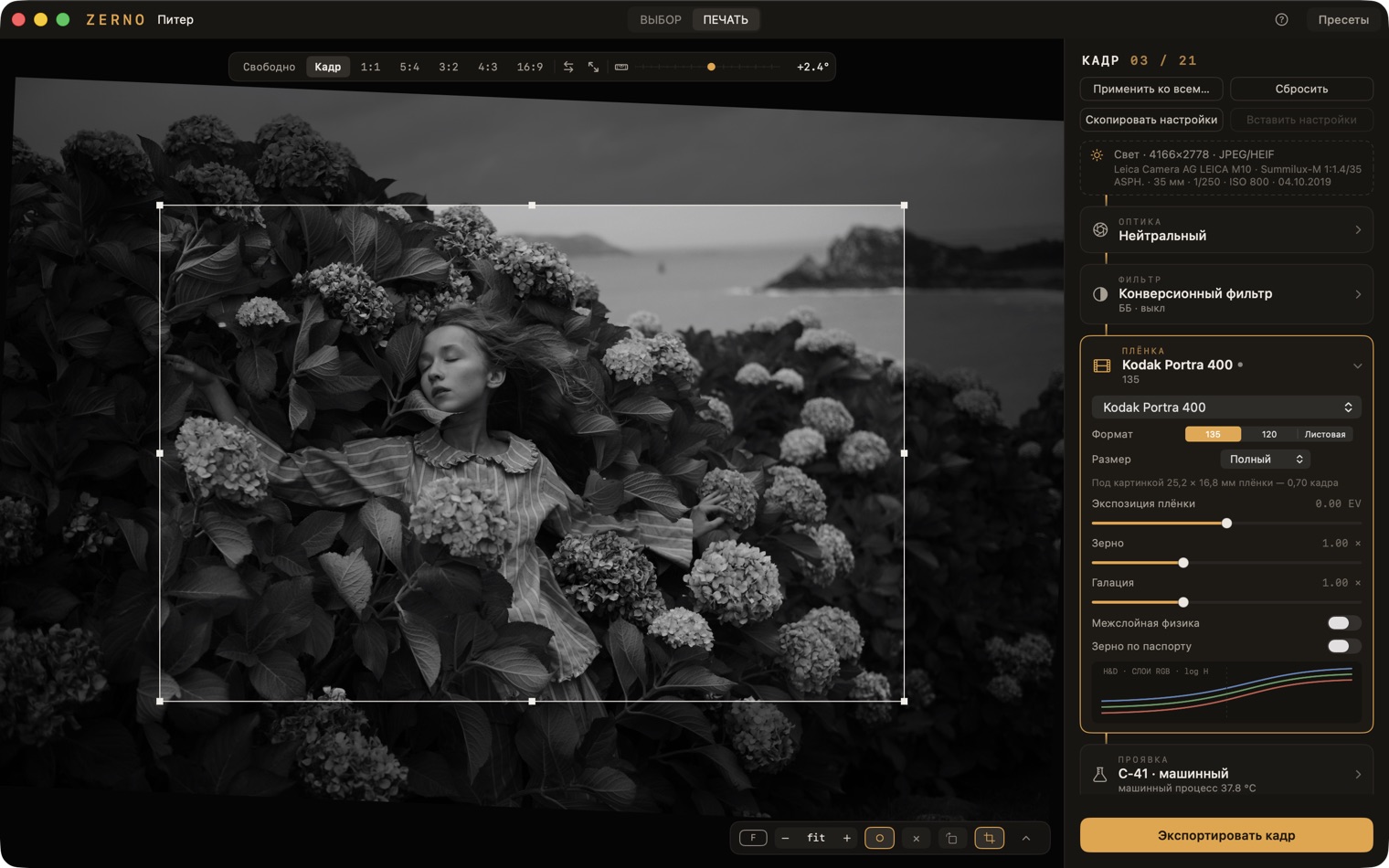 Cropping on the DEVELOP screen
 - The 4×5 sheet. A third format in the FILM block next to 135 and 120. It changes the physical scale: the grain is finer relative to the frame, and the master goes up to 21,818 px on the long side. The film rebate knows the format: thin is the rails of the holder, wider is the whole sheet with its notch code.
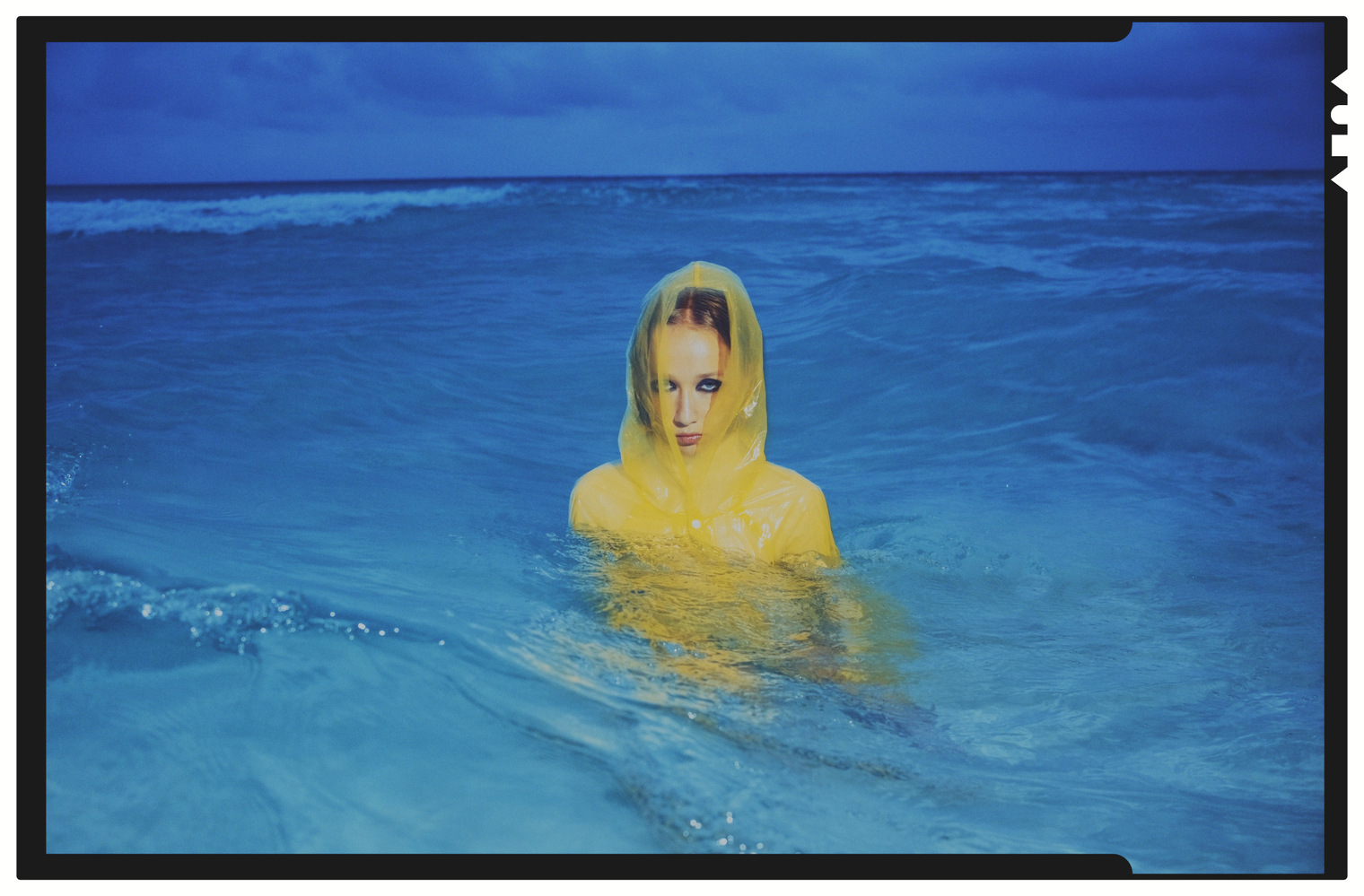 A frame on 4×5 sheet film with the holder's rebate
 - The frame size inside the format. A second picker under “Format”: Full · Half · XPan for 135, 6×4.5 · 6×6 · 6×7 · 6×8 · 6×9 · 6×12 for 120, 3¼×4¼ · 4×5 · 8×10 for sheet film — and “Custom” everywhere, for when the picture does not match a standard frame. The choice is the millimetres of film under the picture, and the line below says how many there are right now: the grain, the halation, the sharpness and the master's ceiling all follow from them. A standard size sets the crop to its own frame, and the wide rebate draws the edge of the film only where the picture IS the whole frame. In the settings (⌘,) there is one rule for every frame: what the crop takes away — a piece of film entirely, only the fineness of the grain, or nothing.
- Sixteen films. Colour: Kodak Pro Image 100 · Vericolor III 160 · Aerocolor IV · Fujicolor Natura 1600 · Konica VX 100 · VX 400 · Centuria 800 · Lucky Color 200 · Svema DS-4 · Sovcolor of the 1950s · Eastmancolor 5247 and two faded copies of it, 20 and 40 years old. Slide: Kodak Aerochrome III 1443, false-colour infrared. Black and white: Svema Foto-65. Instant: Polaroid Polacolor ER — Type 669, 59 and 809 in one stock. 68 films on the shelf in all.
- “Neutral” — no film at all. The first item in the picker: the frame goes to the printing stage with no emulsion, no grain and no halation. For printing from a digital negative — by contact, on the alternative processes, on paper as such.
- Reproduction: inkjet and offset. A fourth group in the PRINTING block. Inkjet on plain or photo paper, with a “Feed banding” knob; offset as newsprint at 85 lpi, magazine at 150 and book at 175. The line under the picker says whether the screen will resolve at this sheet size: “cell 3.2 px of the master — the dots show” or “only the colour of the inks stays”. Black-and-white film prints in offset with the black ink alone.
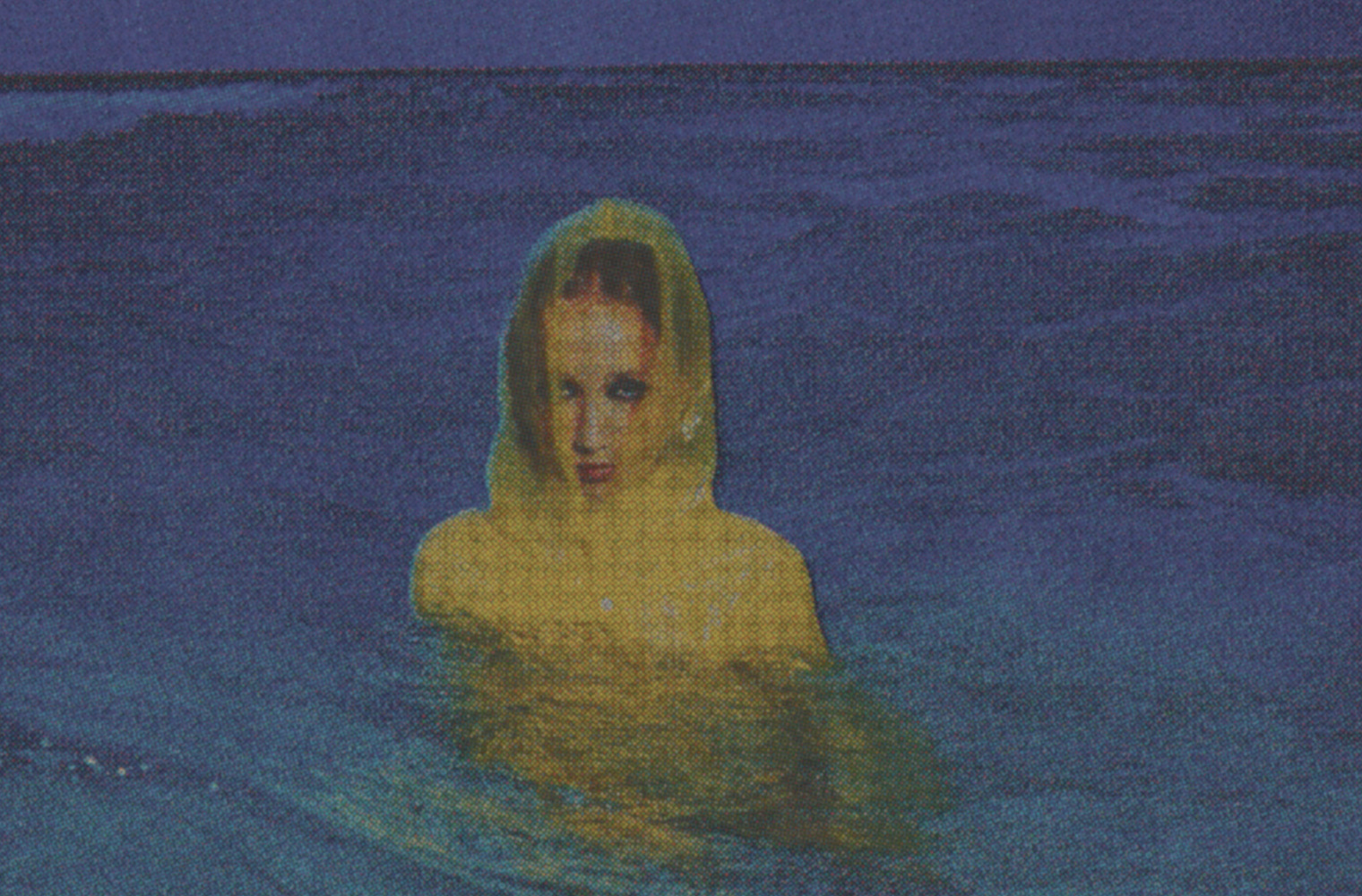 Offset, newsprint: the screen close up
 - Three more papers and a film scanner. Matte RA-4, as in a minilab; platinum-palladium Pt/Pd between platinum and palladium; three-colour gum arabic in four layers; among the scans a “Film scanner” of the Coolscan and Imacon class, while the minilab has been given its honest ceiling of 3089 px. That makes 34 papers and printing techniques.
- Slides, properly. A slide used to hand the screen its bare transmission, and the shadows fell into black. Now it has a positive scan: “Neutral · Film scanner · Minilab · Flatbed” and “Projector / light table” — the slide as it is, on a lightbox. It can be printed on Cibachrome and dye transfer — the way Goldin and Eggleston printed. The curves of Provia, Velvia, E100 and Kodachrome have been rebuilt from the manufacturers' datasheets.
- “Black” and “White”. Two knobs under the contrast in the PRINTING block: how deep the darkest tone goes and how white the lightest one stays. They work on silver, on the alternative processes, on reproduction printing and on scans; on a slide they are the scanner's black and white point.
- Filters in front of the glass. Two new slots. The graduated one: ND of one, two and three stops soft, a hard ND 2, a tobacco and a reverse, with “Line” and “Rotation” knobs. The ray one: a star of 4, 6 and 8 points and an anamorphic flare, with the mount's rotation; on a frame with no point sources it honestly does nothing. There are four slots now, and all of them combine.
- The sieve disc on the Imagon. A picker H5.8 · H7.7 · H9.5 · Custom… instead of two glow knobs — as on the real lens.
- The state of the film. In the DEVELOPMENT block, under the push: “Loaded back to front” — redscale for colour negative; “Expired, years” from 0 to 80 for all four types — up to 40 for instant film, longer than that a pack does not live. Two different substances age in an instant pack: the colour goes off by ten years, while the contrast holds for about eight and gives way by twenty; which dye gave up first is the pack's lottery, yellow or blue, and the dice beside it picks again.
- Three plates — Prokudin-Gorsky. A new type of film: one panchromatic plate, three exposures in a row through a blue, a green and a red filter, three black-and-white negatives, diapositives made from them — and an additive composite, as at the Library of Congress. The cold blue-green shadows come out by themselves: the red plate needed several times the exposure, and by eye that never quite worked out. The plates are not perfectly registered — colour fringes towards the edges, and where the holder did not overlap, coloured bands are left along the edge of the frame. The “Plate misregistration” knob runs from perfectly registered (0) through “as in life” (1) to a loose holder (3), and the film's dice reloads the holder. To view: a film scanner, a triple projector or the CRT screen.
- A monocle and a pinhole. Two new recipes on the B&W shelf. “Kolosov — meniscus”: a single uncorrected meniscus wide open, Svema Foto-65, warm fibre-based paper — glowing halos around everything light and not one sharp place in the frame. “Chezhin — pinhole”: a new “lens” that is not one — a 0.3 mm hole 50 mm from 6×6 film. Its softness is the same from the foreground to the horizon (there is no sharpness to be had, the spot is 0.4 mm on the negative), it falls off by 1.4 stops into the corners, and it has no distortion at all. The pinhole has no “Aperture” knob: there is one hole, and nothing to turn.
- Ten new presets. Not by photographers' names but by their own: “Red safelight” — Svema from the bathroom on graded paper, “Milk and light” — high key through an Imagon, “Carbon and gelatine” — a carbon print, “Cinema 1956” — Sovcolor, “May Day” — DS-4 from the photo club, “From the kiosk” — expired Konica of 1997, “Purple forest” — Aerochrome, “Held to the light” — Kodachrome in a projector, “Long evening” — Velvia under a grad, “Attic find” — a twelve-year-old pack of FP-100C. 36 recipes on the shelf in all, each with a paragraph on why it is built that way.
- The tier badge on DEVELOP. To the left of the zoom, a small capsule with a single letter: “P” is the preview from the cache, “S” is the tier the size of your screen, “F” is everything there is (the master, or the file when it is smaller than the format's ceiling). The exact pixels are in the tooltip. While the next tier is being computed, an arc grows around the capsule — it takes the time from the last computation of the same kind; hide the status bar and the badge moves into the corner of the picture and fades when the work is done. On reproduction papers it is a warning as well: the screen dots appear at exactly the moment the arc goes out.
- Uneven development. A 0…3 knob at the end of the DEVELOPMENT block: tongues from the edges, jets from the sprocket holes, patches of exhausted developer. Every frame has its own pattern, and the dice reloads it.
- Selection in the grid. ⇧-click and ⇧-arrows select a range, ⌘-click picks single frames, a rubber band works on the background, ⌘A takes everything visible and Esc collapses it. Marks, rotation, pasting settings, resetting and “Remove” work on the whole selection in one undo step; the export dialogue gains a “Selected · N” set.
- Rotation and mirroring. R and ⇧R rotate, H and V flip, on both screens; the panel above the grid has four buttons ↺ ↻ ⇋ ⇵. An instant card knows how it is turned: on the square ones the chin stays at the bottom.
- An original or its own process. There are no settings shared by the whole project any more: a frame is either an original or has a process of its own, and the first knob you touch starts printing from “Neutral”. Settings travel explicitly: “Copy” ⌥⌘C and “Paste” ⌥⌘V — between frames, between projects and even between launches — and “Apply to…”, which asks whether to touch the frames that already have settings of their own.
- SELECT without the rack. The selecting screen is frames across the full width and nothing else; the rack waits on DEVELOP. The three buttons “Copy · Paste · Apply to…” and the “Originals | With a process” toggle stayed in the panel above the grid.
- Export progress. The button turns into a bar: “Developing 3 of 12 · MED06316 · ~1:20”, and ✕ stops it after the current file. You can keep working while the export runs; the Dock icon shows the progress, and at the end a notification points at the folder.
- Export, more precise and richer. The dialogue shows the size in pixels: full · ½ · ¼ of the side. The social copy is your choice — “Instagram · 1080 wide” or “Large · 2048 on the long side” — and it goes into the social subfolder. JPEG is written 4:4:4 at quality 95, the copy at 98. The file carries the original's EXIF, keywords with the film and the paper, and the author and © from the settings; a location tag, never. There is a “Show folder after exporting” checkbox.
- Frame state badges. One row in the tile's caption and in the status bar: “orig.” on a frame with no process, ● on a developed one, ⌗ on a cropped one, ↻ on a turned one, ⚠︎ on one whose file is lost. With tooltips on hover.
- The “?” cheat sheet. The button left of “Presets” and the ? key — every key of the current screen on one card.
- Missing originals. You moved the folder, you did not plug the drive in — the project does not break: the frames keep their settings and marks, show the preview from the cache and carry a ⚠︎. The bar above the grid offers “Locate…” — point at the folder and ZERNO will match the files by their fingerprint itself. A frame without its original is skipped on export rather than written out from the preview.
- A folder at once. Drop a folder onto the grid: it walks it through, asks one question about all the RAW + JPEG pairs, and skips the files already in the project, counting them.
- Project backups. The file is copied before every rewrite, and the copies are thinned by age: everything from the last half hour, one per half hour for a day, then one a day and, after a fortnight, one a week. “File → Restore from Backup…” opens the chosen one as a new project without touching the working file. An unlucky “apply to all” no longer costs you the project.
- Grown-up knobs. A double click on a knob returns it to the “Neutral” default, an ⌥-drag is ten times finer, the arrows step, a click on the number lets you type it. The ↺ button in a block's header resets its knobs, ⌥↺ resets the whole block. A dot after the block's name shows that something in it has been touched, and names what.
- EXIF where the film is chosen. Camera, lens, focal length, shutter speed, aperture, ISO and date — in the tooltip on the file name and as a line in the source block.
- Small things for selecting. “Advance After Marking” in the “Marks” menu: O, O, X and the cursor goes on by itself. Tab hides the rack and the status bar, ⇧Tab the toolbar as well, F is full screen.
- Copy a block. Right-click a block's header — “Copy the PRINTING block”, “Paste the PRINTING block”: one paper and one brightness across every frame with different films, without a trip to the presets.
- The body of an instant card. Taken apart from scans: the dark skirt along the edge of the picture (on Instax it is light instead — the white pigment of the reagent), the diamond lattice embossed into the mask, the almost square corners of a Polaroid and the four DIFFERENT corners of an Instax Wide, the shadow on the table. Plus the roller chatter of pack film and the embossed lattice of Silk — from twenty-one scans.
- A table under the print. White, grey, black velvet or linen, table margins from 0.5 to 10 cm and the shadow of the lying sheet. A scan has no table — it has no sheet either.
- The sheet and the stamp. Sizes 9×13 and 10×15, “Custom…” from 5 cm; the studio stamp has a type size from small to very large.
- Twenty-three named presets. “Moriyama — are, bure, boke”, “Hockney — SX-70 joiners”, “Eggleston — dye transfer” and onwards: a photographer or an era, and under them a physical recipe the program really can do. The shelf is laid out in groups: B&W · Colour · Slide · Old processes · Instant.
- The project saves itself. Once a minute, on export and on quitting; “Save Project As…” is needed only to give the file a name. The last project opens at launch, and “New Project” is ⌘N.
- A/B — two versions of a frame side by side. Both are editable, the zoom and the pan are synchronised, Tab moves the focus, and “Take this one” sits under each. Leaving without a choice keeps A.
- The licence from the menu. “Zerno → Licence…”: the term, the type, who it was issued to, this Mac's code, the seats taken and “Unlink this Mac…” — to move Zerno to another Mac without waiting for the lease to run out.
- Settings ⌘,. The “Author” and “©” fields — they go into the exported metadata — the size of the preview cache and “Clear”.
- Trial mode — five days. The licence window has a second road now: “Try it for 5 days”. No code is needed — the server issues a trial licence against your Mac's code, once per machine. Everything in the program works: films, lenses, papers and reproduction printing, batch export, social copies, the contact sheet, every size — and the files that come out are exactly the ones a licence would give you. The internet is needed at every launch: the term is counted by the server, not by the computer's clock. When the five days are over your projects stay where they are — a licence opens them as they were. At the start you can leave your email, and a reminder comes two days before the end.
- One image for every Mac. The build is universal: Apple Silicon and Intel in one file.
02 · Fixed
- Zerno would not start on macOS 14. On Sonoma the shader build failed outright, and instead of the program you got the “Zerno cannot run on this Mac” window — with the wrong reason: the Mac in question could be a 2021 MacBook Pro on an M1 Max. The cause was a single line of our own code: the macOS 15 compiler accepted it and the macOS 14 compiler did not, and by construction we could never see that on our own machine. Shaders are now always compiled with the language of the oldest system we promise to support, and our own test run guards it rather than the customer. The refusal window has also stopped blaming a sound computer: if the graphics card is fine and the shaders did not build, it says so, along with where to write.
- ⌘A in SELECT finally selects every frame. The “Select All Frames” item was in the “Edit” menu, but the key did nothing: the system “Select All” in that same menu took ⌘A for itself and sent it where nobody knows about frames. The key is ours now — in the grid it selects everything visible, and in a text field it still selects the text.
- The settings ⌘, no longer close the project or bring the program down. The single-window guard took the settings window for a second project window, closed the project as the spare one, and closing the settings turned out to be quitting.
- The licence no longer asks for the keychain password at every launch: the token lives in the application's own file. And checking for updates no longer calls “there is no new version” a connection error.
- A frame's settings no longer spread to its neighbours as you page through. An opened frame was given a copy of the last look, and “I copied it onto the second one” turned out to be “it was applied to every frame I looked at”. A frame is now either an original or has a process of its own, and looking changes nothing.
- The 6×9 frame size is no longer lost by “Copy / Paste settings”: the key went into the clipboard correctly and silently turned into 6×6 on the way back.
- The crop no longer drifts away from the cursor and no longer passes a rectangle off as 1:1 on frames with an EXIF rotation: the shape of the source was read from the metadata, while the picture arrives already turned. A side handle at the edge of the frame grows it again, and the smallest frame keeps the ratio you chose.
- Full size on offset, inkjet and the screen no longer brings the program down. When the master with the print raster arrived and the frame had a sheet rebate, the program quit: the compiler built one place that copies the frame mask incorrectly. That place is rewritten, and the build now checks the finished program for this kind of error itself.
- Undo brings back not only the picture but the source line as well: after undoing a rotation or a crop the rack still showed the previous size.
- The grid no longer opens at the beginning of the project when you come back from DEVELOP, and shows the frame you were on. Frames with an EXIF rotation no longer lie on their side in the previews — the old cache rebuilds itself.
- The “Originals” toggle no longer travels into the printing: it is about showing the grid, not about the process.
- Reproduction papers no longer make you wait a second after every knob: the colour separation and the blurs are computed in parallel, and the offset preview became five times faster.
- The social copy no longer comes out smaller than the size promised and no longer shows the wrong part of the frame: it is a downscaled copy of the master now, not a second render.
- The output dialogues remember the last export, the chosen option is visible in the dark theme, and the line with the file size is no longer cut off by the edge of the panel.
- The mounting of a card no longer offers items that do not apply to it: an integral instant has no print borders, no film rebate and no plate mark.
- A knob that does not work explains itself by its look rather than by vanishing: on a stock without datasheet grain or interlayer physics the toggle sits greyed out, and the reason is in the tooltip.
- The sieve disc on the Imagon: the “Custom…” item could not be chosen — the list jumped straight back to the previous disc, and the two glow knobs never opened.
- More — eight small things in the rack, the export and the licence window: small buttons are caught anywhere, not by the pixel; the caption under a card's frame reads on a light picture; a slide on a scan has a living contrast and brightness instead of dead printing knobs; and the window tabs no longer promise what does not exist.
03 · Changed
- The preview cache knows its limit. It used to grow without one — a few shoots and tens of gigabytes had piled up. There is a limit in the settings now (16 GB by default, 4…128 or none at all to choose from), and the program tidies up by itself: first the rubbish from earlier versions, then what is cold and not yours — shoots you closed as developed and have not opened for a month. It never touches the open project, and on a nearly full disk it keeps another 10 GB free. The “Clear unused” and “Clear all” buttons are there as well. Previews are now known by the content of the file rather than by its path: moving a folder and “Locate file…” no longer lose them — but once, on the way to this version, the cache is computed again.
- The “?” cheat sheet and clicking the track. The key card on both screens has been brought up to what there really is: Tab and ⇧Tab, the knobs, the ↺ that resets a block, ⌘O with a folder, the zoom and ⌥⌘S. And the track of a knob can now simply be clicked — the knob jumps where you pointed; a double click still returns it to its default.
- The words of selecting. The mark is “○ Pick”, the filter is “Picks”, the button is “Export picks”. The screen is still SELECT.
- There is no process shared by every frame. The “Make it the default” button is gone, and “Apply to…” has taken its place. Old projects open as they were: the former shared process is written into the frames that had none of their own when the file is opened.
- The export buttons. “Export picks” moved into the panel above the grid, next to “Sheet → file”; on DEVELOP there is one button at the bottom of the rack, “Export frame”.
- Social copies go into a subfolder. The masters lie in the folder you chose, the copies in
social/beside them; the names are unchanged. - The film rebate follows the format. On 120 and 4×5 the rebate is its own now — the bands of the film edges with their ears, the rails of the holder; on 135 everything is as it was.
Updates
The program checks for a new version once a day and offers it by itself. How to update by hand and why macOS asks for permission for every build — “How updates work”.